O&O DiskImage 20 Professional Lifetime License Key
Content: text (0 symbol)
Available: 20
Uploaded: 08.06.2026
Positive responses: 0
Negative responses: 0
Sold: 0
Refunds: 0
$1.53
🖥️ O&O DiskImage 20 Professional 🖥️
💗 A reliable desktop backup, drive cloning, and system imaging utility designed with a perpetual lifetime license to securely protect your entire Windows system against data loss, hardware failure, and cyber threats. 💗
Software Features
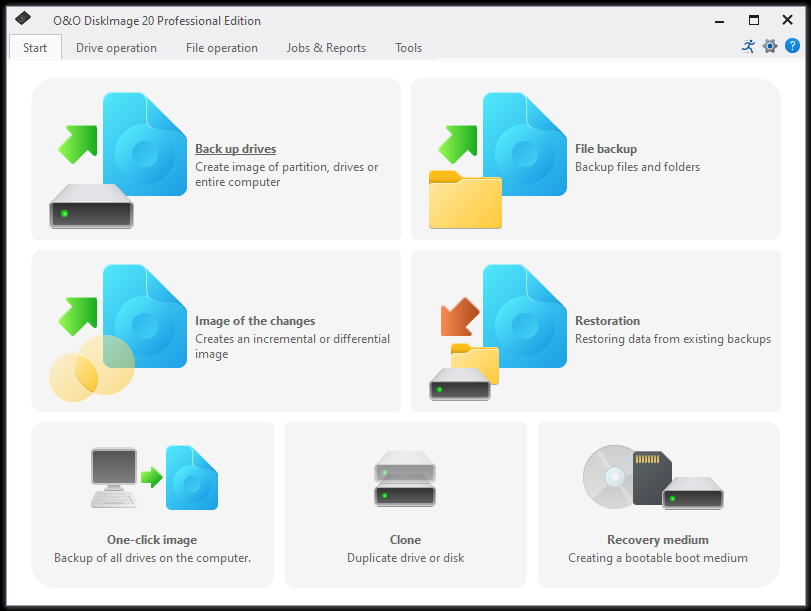
🛠️ Backs up your entire PC, individual drives, or partitions into highly compressed images with a single click.
🛠️ Includes full file-level backup functionality to target specific folders, documents, or media libraries.
🛠️ Offers complete, incremental, and differential backup modes to minimize destination storage consumption.
🛠️ Features O&O DiskImage To Go, which automatically transforms any connected external drive into a bootable rescue tool and preferred backup destination.
🛠️ Supports direct file creation and deep management for virtual machines using modern VHD and VHDX file formats (handling images up to 64 TB).
🛠️ Provides the Machine Independent Restore (M.I.R.) engine to seamlessly restore an image onto entirely different computer hardware, automatically adjusting system drivers.
🛠️ Includes a built-in WinPE-based rescue medium builder to quickly deploy a bootable system recovery partition on USB or DVD.
🛠️ Utilizes plug-and-play triggers to instantly kick off a file or partition backup the exact moment your assigned external drive is plugged in.
🛠️ Secures sensitive image archives against unauthorized access with robust AES 128-bit and 256-bit data encryption.
🛠️ And many more...
Software Specifications
🖥️ System Requirements: Windows 11, Windows 10, Windows 8, Windows 7
🌐 Internet connection is required to activate the program (license key)
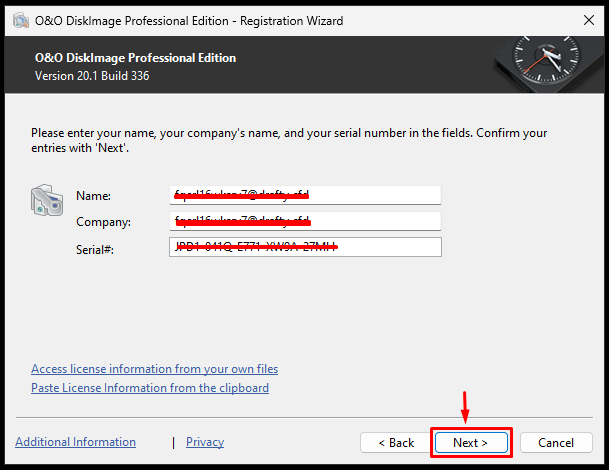
🔑 After payment, you instantly receive name, company, and serial key in the form of (XXXXX,XXXXX,XXXX-XXXX-XXXX-XXXX-XXXX)
License Spesification
📌 Original: Official from the store.
📌 Unique license key: A special code just for you.
📌 Valid for lifetime (O&O DiskImage 20 Professional)
How to use license
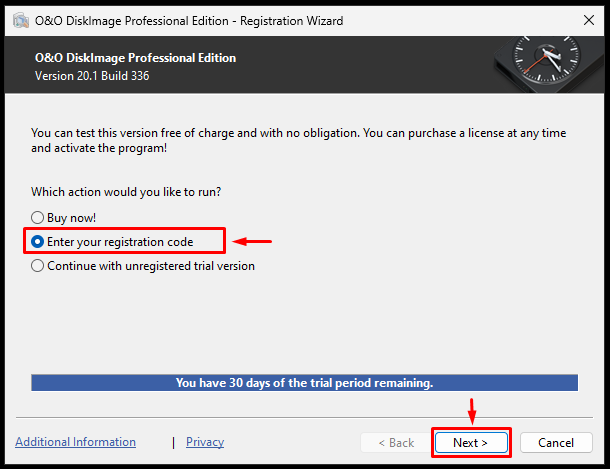
🔐 Follow the instructions during the program installation, then go to the "Enter registration code" in menu.
Troubleshooting guidelines
❌ Do not write negative reviews.
✅ Go to "chat" tab and explain the problem.
✅ We will response within 24 hours.
✅ For effective communication, we may request you to record a video confirming your activation attempt (using the purchased key).
💗 A reliable desktop backup, drive cloning, and system imaging utility designed with a perpetual lifetime license to securely protect your entire Windows system against data loss, hardware failure, and cyber threats. 💗
Software Features
🛠️ Backs up your entire PC, individual drives, or partitions into highly compressed images with a single click.
🛠️ Includes full file-level backup functionality to target specific folders, documents, or media libraries.
🛠️ Offers complete, incremental, and differential backup modes to minimize destination storage consumption.
🛠️ Features O&O DiskImage To Go, which automatically transforms any connected external drive into a bootable rescue tool and preferred backup destination.
🛠️ Supports direct file creation and deep management for virtual machines using modern VHD and VHDX file formats (handling images up to 64 TB).
🛠️ Provides the Machine Independent Restore (M.I.R.) engine to seamlessly restore an image onto entirely different computer hardware, automatically adjusting system drivers.
🛠️ Includes a built-in WinPE-based rescue medium builder to quickly deploy a bootable system recovery partition on USB or DVD.
🛠️ Utilizes plug-and-play triggers to instantly kick off a file or partition backup the exact moment your assigned external drive is plugged in.
🛠️ Secures sensitive image archives against unauthorized access with robust AES 128-bit and 256-bit data encryption.
🛠️ And many more...
Software Specifications
🖥️ System Requirements: Windows 11, Windows 10, Windows 8, Windows 7
🌐 Internet connection is required to activate the program (license key)
🔑 After payment, you instantly receive name, company, and serial key in the form of (XXXXX,XXXXX,XXXX-XXXX-XXXX-XXXX-XXXX)
License Spesification
📌 Original: Official from the store.
📌 Unique license key: A special code just for you.
📌 Valid for lifetime (O&O DiskImage 20 Professional)
How to use license
🔐 Follow the instructions during the program installation, then go to the "Enter registration code" in menu.
Troubleshooting guidelines
❌ Do not write negative reviews.
✅ Go to "chat" tab and explain the problem.
✅ We will response within 24 hours.
✅ For effective communication, we may request you to record a video confirming your activation attempt (using the purchased key).
No feedback yet