Honest Sign QR Extractor
Content: ссылка на скачивания.txt (169 B)
Uploaded: 07.06.2026
Positive responses: -1
Negative responses: 0
Sold: -1
Refunds: -1
$12.52
, Product description:
PDF → Excel, CSV, XML, JSON, TXT Converter
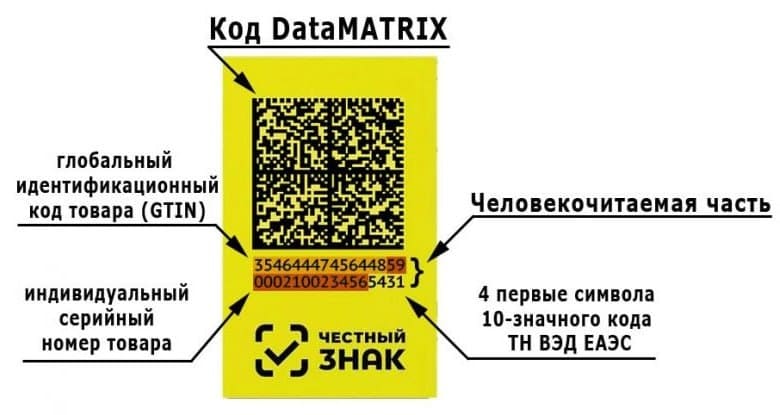
A utility for extracting labeling codes (KiZ, QR, DM) from PDF documents with uploading to required reporting formats.
What is it for ?
The Honest SIGN system requires working with labeling codes. These codes often come in PDF files (invoices, labels, registers). Manually retyping the codes takes a long time and with errors.
My script solves this problem in 10 seconds.
, What the program can do
Function Description
Reads a PDF and takes a file from the folder where the program is located
🔍 Recognizes QR codes (Data Matrix / QR) from labeling labels
📝 Recognizes the Text under the code (usually it is the key marking code itself)
💾 Saves in 5 formats Excel, CSV, XML, JSON, TXT — any to choose from
⚡ Two QR modes (slow but accurate) and TXT (fast, text under QR)
, Step - by - step instructions
Step What are we doing
1 Create a folder, put it there single.exe
2 Put a PDF with labeling labels in the same folder (for example, an invoice.pdf)
3 Launch single.exe
4 Enter the name of the pdf file without the extension (for example, invoice)!!!!!!!!!!!!!!
5 Press Enter
6 Select the mode: qr (for codes) or txt (for text under QR codes, if available)
7 Press Enter
8 Select the desired format: excel / csv / xml / json / txt (you will need to enter a number)
9 Press Enter — the program saves the file with the codes
10 Press Enter to exit
The result: A file with labeling codes, ready to upload to Honest SIGN, 1C, Excel or reporting.
What tasks is an Honest Sign suitable for ?
How does the task help
📦 Product acceptance Extracts codes from the PDF invoice for reconciliation
, Saves reports in XML / CSV formats for an Honest mark
,What is included in the purchase
single.exe — the program itself.
, System requirements
Windows 7 / 8 / 10 / 11
50 MB of free space
It does not require installation — just run the .exe (The first time may be a long startup, depends on your PC)
PDF → Excel, CSV, XML, JSON, TXT Converter
A utility for extracting labeling codes (KiZ, QR, DM) from PDF documents with uploading to required reporting formats.
What is it for ?
The Honest SIGN system requires working with labeling codes. These codes often come in PDF files (invoices, labels, registers). Manually retyping the codes takes a long time and with errors.
My script solves this problem in 10 seconds.
, What the program can do
Function Description
Reads a PDF and takes a file from the folder where the program is located
🔍 Recognizes QR codes (Data Matrix / QR) from labeling labels
📝 Recognizes the Text under the code (usually it is the key marking code itself)
💾 Saves in 5 formats Excel, CSV, XML, JSON, TXT — any to choose from
⚡ Two QR modes (slow but accurate) and TXT (fast, text under QR)
, Step - by - step instructions
Step What are we doing
1 Create a folder, put it there single.exe
2 Put a PDF with labeling labels in the same folder (for example, an invoice.pdf)
3 Launch single.exe
4 Enter the name of the pdf file without the extension (for example, invoice)!!!!!!!!!!!!!!
5 Press Enter
6 Select the mode: qr (for codes) or txt (for text under QR codes, if available)
7 Press Enter
8 Select the desired format: excel / csv / xml / json / txt (you will need to enter a number)
9 Press Enter — the program saves the file with the codes
10 Press Enter to exit
The result: A file with labeling codes, ready to upload to Honest SIGN, 1C, Excel or reporting.
What tasks is an Honest Sign suitable for ?
How does the task help
📦 Product acceptance Extracts codes from the PDF invoice for reconciliation
, Saves reports in XML / CSV formats for an Honest mark
,What is included in the purchase
single.exe — the program itself.
, System requirements
Windows 7 / 8 / 10 / 11
50 MB of free space
It does not require installation — just run the .exe (The first time may be a long startup, depends on your PC)
Actions:
Enter the name of the document (pdf): delivery_marking
Select the mode (QR/txt): QR
Select the format:
1 - Save GS delimited codes in TXT
2 - Save GS delimited codes in JSON
3 - Save GS delimited codes in XML
4 - Save GS delimited codes in CSV
5 - Save codes in TXT
6 - Save codes in JSON
7 - Save codes in XML
8 - Save codes in CSV
9 - Save codes in EXEL
Enter the value:9
Result:
The delivery_mark file.xlsx with a column of marking codes (CIC), ready for reconciliation and reporting.
CUSTOM IMPROVEMENTS ARE ACCEPTED.
Enter the name of the document (pdf): delivery_marking
Select the mode (QR/txt): QR
Select the format:
1 - Save GS delimited codes in TXT
2 - Save GS delimited codes in JSON
3 - Save GS delimited codes in XML
4 - Save GS delimited codes in CSV
5 - Save codes in TXT
6 - Save codes in JSON
7 - Save codes in XML
8 - Save codes in CSV
9 - Save codes in EXEL
Enter the value:9
Result:
The delivery_mark file.xlsx with a column of marking codes (CIC), ready for reconciliation and reporting.
CUSTOM IMPROVEMENTS ARE ACCEPTED.
No feedback yet