Samsung Tool - account rental
Content: text (0 symbol)
Available: 1
Uploaded: 03.06.2026
Positive responses: 0
Negative responses: 0
Sold: 0
Refunds: 0
Seller: FENIX-GSM
information about the seller and its items
Loyalty discount! If the total amount of your purchases from the seller more than:
| $10 | the discount is | 3% |
| $20 | the discount is | 5% |
| $50 | the discount is | 7% |
| $100 | the discount is | 10% |
| $300 | the discount is | 15% |
$5.45
VERIFY THE SERVER STATUS (ONLINE / OFFLINE) ON THE CHEETAH WEBSITE BEFORE RENTING!!!
THE ACCOUNT HAS NO CREDITS!!! ONCE CREDITS ARE ADDED, NO REFUNDS ARE AVAILABLE!!!
OPERATIONS REQUIRING AUTHORIZATION CAN ONLY BE PERFORMED WHEN THE SERVER IS ONLINE!
IMPORTANT: WHEN ADDING CREDITS, YOU MUST ENTER THE EXACT LOGIN CREDENTIALS PROVIDED TO YOU FOR THIS RENTAL ACCOUNT!!!
THE ACCOUNT HAS NO CREDITS!!! ONCE CREDITS ARE ADDED, NO REFUNDS ARE AVAILABLE!!!
OPERATIONS REQUIRING AUTHORIZATION CAN ONLY BE PERFORMED WHEN THE SERVER IS ONLINE!
IMPORTANT: WHEN ADDING CREDITS, YOU MUST ENTER THE EXACT LOGIN CREDENTIALS PROVIDED TO YOU FOR THIS RENTAL ACCOUNT!!!
https://fenix-gsm.com/product/cheetah-pro-tool-rental/ — ADD CREDITS TO ACCOUNT BALANCE
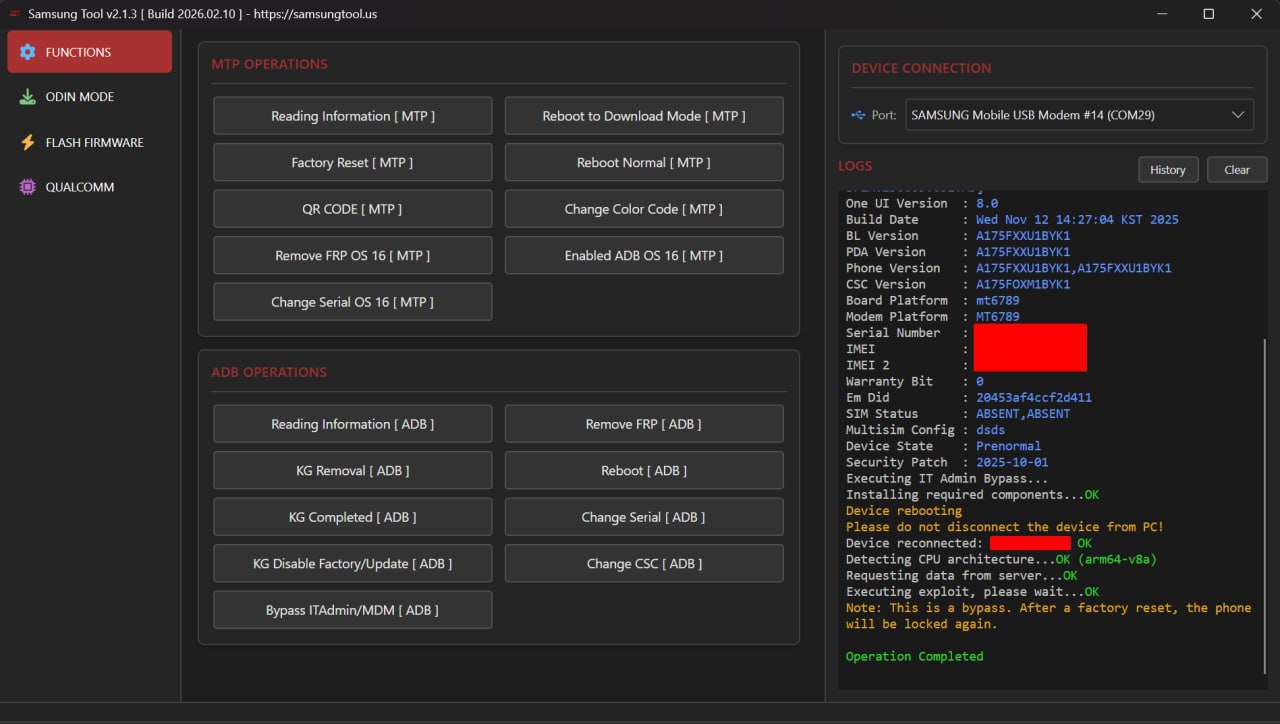
The Samsung Tool software is designed to bypass the Knox Guard (KG Lock) on Samsung devices. This solution operates at the software level—without affecting the device´s hardware—and allows you to completely suppress all Knox Guard notifications and restrictions, thereby restoring the device to a state of normal operation.Key Features:
• Stable KG Lock bypass that prevents re-locking after a factory reset. Performing a factory reset will not result in the re-activation of the security lock.
• Ease of Use: The procedure is completed in just a few clicks and does not require advanced technical expertise.
• Support for Samsung models running on the Qualcomm platform (2025–2026 releases), as well as over 300 additional models featuring current bootloaders. Coverage includes the Galaxy A, M, S, Z, and Tab series running Android versions 10 through 16. • Comprehensive suite of service operations: flashing, wiping, backup, factory reset, FRP removal, removal of "Lost Mode," removal of the "Please Call Me" message, resolution of MDM boot errors, serial number modification, EFS backup and cleanup, and reading of GPT and device information.
• Removal of third-party service locks: PayJoy Lock, Device Control Lock, and Offline Lock. Patches are supported for select devices through January 2026.
• Advanced Odin, MTP, and ADB capabilities: direct loading of ZIP archives via the Odin protocol without prior extraction, and changing the CSC and serial number via MTP/ADB. Support for patches released in August–September 2025.
• MDM and IT Administrator registration bypass: disabling management policies and removing "Device Managed / Admin Lock" restrictions following a factory reset. This support is applicable to select devices released in 2025–2026.
• Startup procedure: on the initial "Hello" screen, a QR code scan is triggered to enable ADB debugging; the tool then performs the bypass via a USB connection, followed by a device reboot, data reset, and standard device setup.
Operational Notes:
• The implemented solution constitutes a *bypass* rather than an irreversible removal of the lock from Samsung´s servers.
• To maintain system stability, it is not recommended to install OTA system updates after performing the bypass.
• Should the KG Lock reappear after a factory reset, simply repeat the procedure starting from the first step; re-executing the process resolves the issue in most cases.
• All operations are performed using software-based methods, requiring no physical modification or intervention regarding the device´s hardware components.
https://samsungtool.us — Official Website
https://youtu.be/PLNWVMRk-MU?si=Mrq9UX8bezshVFdV — Complete User Guide
https://t.me/+UokMBkvsB0xPt4V1 — Official Support Channel
https://fenix-gsm.key.shop/page/drivers — Device Drivers (Installation Required)
No registration is required. Immediately after payment, you will receive a login and password to access the software. The rental period begins counting down from that moment.
Please note: The rental period runs continuously and cannot be paused. Additionally, you may not switch computers while using the software.
We accept no responsibility for your actions, nor for the current status or operational stability of the software´s servers.
No feedback yet