Neural network-powered text-to-speech in Russian and English directly on your compute
Content: text (0 symbol)
Uploaded: 22.05.2026
Positive responses: 0
Negative responses: 0
Sold: 0
Refunds: 0
$5.32
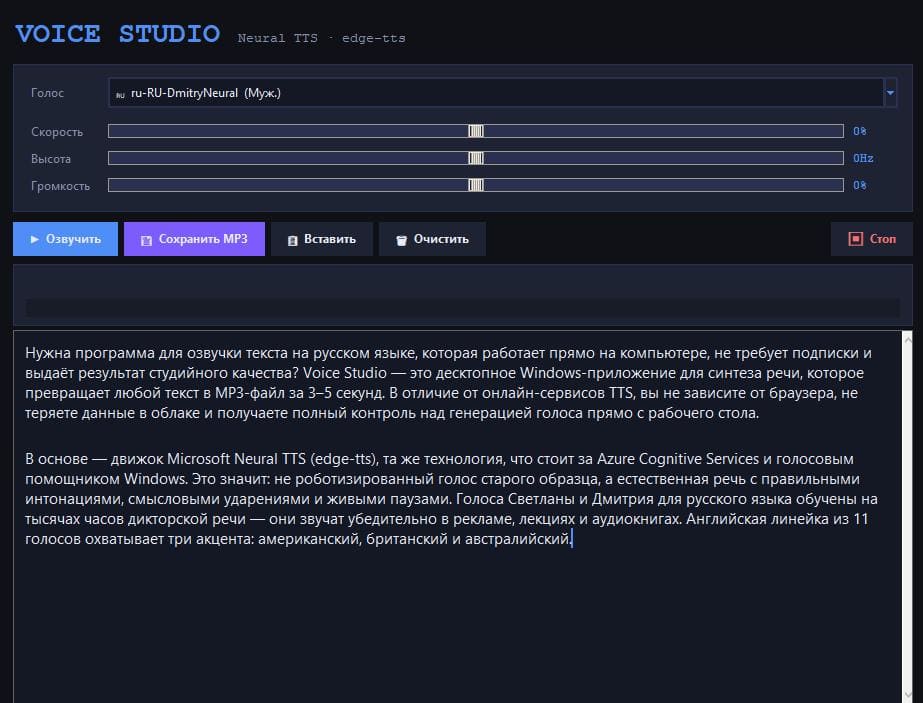
**Voice Studio — neural network-powered voice-over of Russian and English text directly on your computer**
One-time payment. Full version forever. No subscriptions or character limits.
Voice Studio is a convenient Windows program for professional voice-over of any text. It converts written text into natural human speech and saves the result as an MP3 file in seconds.
The program uses cutting-edge Microsoft Neural TTS technology—the same one used in Azure Cognitive Services. Voices sound natural, with correct intonation, pauses, and stress—without a robotic sound.
### Why choose Voice Studio
- One-time payment and unlimited use.
- A fully operational application with a user-friendly interface—no Python, command line, or complicated settings.
- High-quality Microsoft neural network voices for Russian and English.
- Fine-tune speed, pitch, and volume.
- All MP3 files are saved to your computer.
- Works on Windows 10 and 11.
### What the program can do
- Russian voiceover.
The best neural network voices: female "Svetlana" and male "Dmitry." Ideal for audiobooks, commercials, videos, and educational materials.
- English voiceover.
11 high-quality voices with three accents: American, British, and Australian (Jenny, Aria, Guy, Davis, Sonia, Ryan, Natasha, and others).
- Fine-tuning your voice.
Three independent parameters:
- Speech rate (±50)
- Pitch (±20 Hz)
- Volume (±50)
You can make your voice more dynamic for commercials or calmer for meditations and audiobooks.
- Instant listening and saving.
After clicking the "Speak" button, the text is immediately played in the system player. One click saves the MP3 file to any folder.
- Convenient text editing tools.
Quick paste from the clipboard, clear the field, stop synthesis at any time, animated progress bar with color indicators.
- Modern dark interface.
Minimalist design, easy on the eyes even during long work sessions.
### Who will benefit from this program
- Authors, bloggers, and journalists — for creating audio versions of articles and podcasts.
- Teachers and online course creators — for voicing lectures and educational materials.
- Marketers and advertisers — for quickly creating voiceovers and promotions.
- YouTube bloggers and video production — for high-quality voiceovers.
- Audiobook authors — for self-publishing on LitRes, Storytel, and other platforms.
- Businesses — for answering machines, presentations, and customer service.
- For developers — for testing voice interfaces and chatbots.
### How to use Voice Studio
1. Download and install the program (installation takes less than a minute).
2. Paste your text into the editor.
3. Select a voice and adjust the speed, pitch, and volume as needed.
4. Click "Speak" — hear the result instantly.
5. Save the finished MP3 file to the desired folder.
The program doesn´t store your text and works with any size — from short messages to entire book chapters.
### License Terms
- Lifetime license for one device.
- One fixed payment.
- Up to 5 reinstalls on one computer.
- Hardware-based copy protection.
- No subscriptions, limits, or hidden fees.
Voice Studio is a simple and powerful tool that replaces expensive online services and studio recording. High-quality voiceover is now accessible to everyone without monthly fees.
With a one-time payment, you can create professional audio materials for years to come—quickly, conveniently, and without limitations.
Ready to create studio-quality voiceovers right on your computer?
Click the "Buy" button and get access to the program immediately after payment.
One-time payment. Full version forever. No subscriptions or character limits.
Voice Studio is a convenient Windows program for professional voice-over of any text. It converts written text into natural human speech and saves the result as an MP3 file in seconds.
The program uses cutting-edge Microsoft Neural TTS technology—the same one used in Azure Cognitive Services. Voices sound natural, with correct intonation, pauses, and stress—without a robotic sound.
### Why choose Voice Studio
- One-time payment and unlimited use.
- A fully operational application with a user-friendly interface—no Python, command line, or complicated settings.
- High-quality Microsoft neural network voices for Russian and English.
- Fine-tune speed, pitch, and volume.
- All MP3 files are saved to your computer.
- Works on Windows 10 and 11.
### What the program can do
- Russian voiceover.
The best neural network voices: female "Svetlana" and male "Dmitry." Ideal for audiobooks, commercials, videos, and educational materials.
- English voiceover.
11 high-quality voices with three accents: American, British, and Australian (Jenny, Aria, Guy, Davis, Sonia, Ryan, Natasha, and others).
- Fine-tuning your voice.
Three independent parameters:
- Speech rate (±50)
- Pitch (±20 Hz)
- Volume (±50)
You can make your voice more dynamic for commercials or calmer for meditations and audiobooks.
- Instant listening and saving.
After clicking the "Speak" button, the text is immediately played in the system player. One click saves the MP3 file to any folder.
- Convenient text editing tools.
Quick paste from the clipboard, clear the field, stop synthesis at any time, animated progress bar with color indicators.
- Modern dark interface.
Minimalist design, easy on the eyes even during long work sessions.
### Who will benefit from this program
- Authors, bloggers, and journalists — for creating audio versions of articles and podcasts.
- Teachers and online course creators — for voicing lectures and educational materials.
- Marketers and advertisers — for quickly creating voiceovers and promotions.
- YouTube bloggers and video production — for high-quality voiceovers.
- Audiobook authors — for self-publishing on LitRes, Storytel, and other platforms.
- Businesses — for answering machines, presentations, and customer service.
- For developers — for testing voice interfaces and chatbots.
### How to use Voice Studio
1. Download and install the program (installation takes less than a minute).
2. Paste your text into the editor.
3. Select a voice and adjust the speed, pitch, and volume as needed.
4. Click "Speak" — hear the result instantly.
5. Save the finished MP3 file to the desired folder.
The program doesn´t store your text and works with any size — from short messages to entire book chapters.
### License Terms
- Lifetime license for one device.
- One fixed payment.
- Up to 5 reinstalls on one computer.
- Hardware-based copy protection.
- No subscriptions, limits, or hidden fees.
Voice Studio is a simple and powerful tool that replaces expensive online services and studio recording. High-quality voiceover is now accessible to everyone without monthly fees.
With a one-time payment, you can create professional audio materials for years to come—quickly, conveniently, and without limitations.
Ready to create studio-quality voiceovers right on your computer?
Click the "Buy" button and get access to the program immediately after payment.
No feedback yet