EA Gift Card 25$ (USA)
Content: text (0 symbol)
Available: 1
Uploaded: 20.05.2026
Positive responses: 0
Negative responses: 0
Sold: 0
Refunds: 0
$21.99
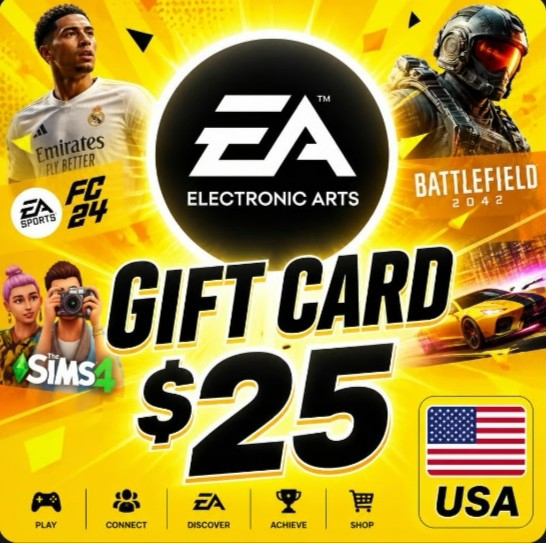
🎮 $25 EA Gift Card (🇺🇸 USA)
⚡ AUTO-REDEEM 24/7! Code on screen immediately after payment! 🚀
🔥 Spend on donations and games:
⚽ EA SPORTS FC 26 / FIFA
🔫 Apex Legends (Apex Coins)
💎 The Sims 4 (DLC)
👑 EA Play / Pro Subscription
🚨 IMPORTANT:
🌍 Account region is strictly US! Currency: $ 💵
🔧 Activation is strictly via VPN in the USA 🇺🇸
🤝 BRIEF REFUND POLICY:
The code is digital and issued to one person. If you entered the wrong region, there is no refund. 😔 Please check your account!
🛡️ Code 100 is valid. If you have any real technical issues, I´ll help you in the chat! 🙌
💚 Is this region suitable? Click "BUY"! 🏆
⚠️ IMPORTANT: Requirements for Activation
Account Region: United States (USA) ONLY. The code will not work on accounts from other regions.
VPN: You MUST use a high-quality VPN with a US location to redeem the code successfully.
Check Your Settings: Make sure your EA profile settings show "United States" in the "Country/Region" field.
🚀 Step-by-Step Activation Guide
Turn on your VPN: Launch your VPN app, select a US server, and connect.
Log In: Go to the official EA website (ea.com) or open the EA app on your PC. Log into your account.
Open Settings:
On the website: Click your profile icon in the top right ➡️ "Account Settings".
In the app: Click your profile menu ➡️ "Settings".
Go to Redeem Page: Find the "Redeem Product Code" tab, or go to "Payment & Shipping" and click "Add Funds".
Enter the Code: Copy the code you received after purchase, paste it into the field, and click "Next" / "Confirm".
Done! Your EA wallet balance has been successfully credited with $25.
🛠️ Troubleshooting (What to do if the code won´t activate)
If you get an error, do not panic. In 99% of cases, the issue is solved by strictly following these steps:
Check your VPN — Free VPNs often leak your real IP, and the EA website detects your true location. Change the server or try a different VPN app. Verify your location via 2ip.ru (it must strictly show the United States).
Check your EA Account Region — Go to EA Account Settings ➡️ "About me" tab ➡️ "Regional Settings". It MUST say United States. If it shows a different country, change it to the US or create a completely new, clean account.
Switch your browser or try Incognito mode — The EA website often caches your old location data. Turn on your VPN, open a new private (Incognito) window in your browser, and try redeeming the code again. This guarantees the site will detect your new US IP.
⚡ AUTO-REDEEM 24/7! Code on screen immediately after payment! 🚀
🔥 Spend on donations and games:
⚽ EA SPORTS FC 26 / FIFA
🔫 Apex Legends (Apex Coins)
💎 The Sims 4 (DLC)
👑 EA Play / Pro Subscription
🚨 IMPORTANT:
🌍 Account region is strictly US! Currency: $ 💵
🔧 Activation is strictly via VPN in the USA 🇺🇸
🤝 BRIEF REFUND POLICY:
The code is digital and issued to one person. If you entered the wrong region, there is no refund. 😔 Please check your account!
🛡️ Code 100 is valid. If you have any real technical issues, I´ll help you in the chat! 🙌
💚 Is this region suitable? Click "BUY"! 🏆
⚠️ IMPORTANT: Requirements for Activation
Account Region: United States (USA) ONLY. The code will not work on accounts from other regions.
VPN: You MUST use a high-quality VPN with a US location to redeem the code successfully.
Check Your Settings: Make sure your EA profile settings show "United States" in the "Country/Region" field.
🚀 Step-by-Step Activation Guide
Turn on your VPN: Launch your VPN app, select a US server, and connect.
Log In: Go to the official EA website (ea.com) or open the EA app on your PC. Log into your account.
Open Settings:
On the website: Click your profile icon in the top right ➡️ "Account Settings".
In the app: Click your profile menu ➡️ "Settings".
Go to Redeem Page: Find the "Redeem Product Code" tab, or go to "Payment & Shipping" and click "Add Funds".
Enter the Code: Copy the code you received after purchase, paste it into the field, and click "Next" / "Confirm".
Done! Your EA wallet balance has been successfully credited with $25.
🛠️ Troubleshooting (What to do if the code won´t activate)
If you get an error, do not panic. In 99% of cases, the issue is solved by strictly following these steps:
Check your VPN — Free VPNs often leak your real IP, and the EA website detects your true location. Change the server or try a different VPN app. Verify your location via 2ip.ru (it must strictly show the United States).
Check your EA Account Region — Go to EA Account Settings ➡️ "About me" tab ➡️ "Regional Settings". It MUST say United States. If it shows a different country, change it to the US or create a completely new, clean account.
Switch your browser or try Incognito mode — The EA website often caches your old location data. Turn on your VPN, open a new private (Incognito) window in your browser, and try redeeming the code again. This guarantees the site will detect your new US IP.
Thank you for your purchase! I would appreciate your positive feedback! 💚
No feedback yet