VisualXP Ultimate for X-Plane 12
Content: text (0 symbol)
Available: 2
Uploaded: 07.05.2026
Positive responses: 0
Negative responses: 0
Sold: 1
Refunds: 0
$9.02
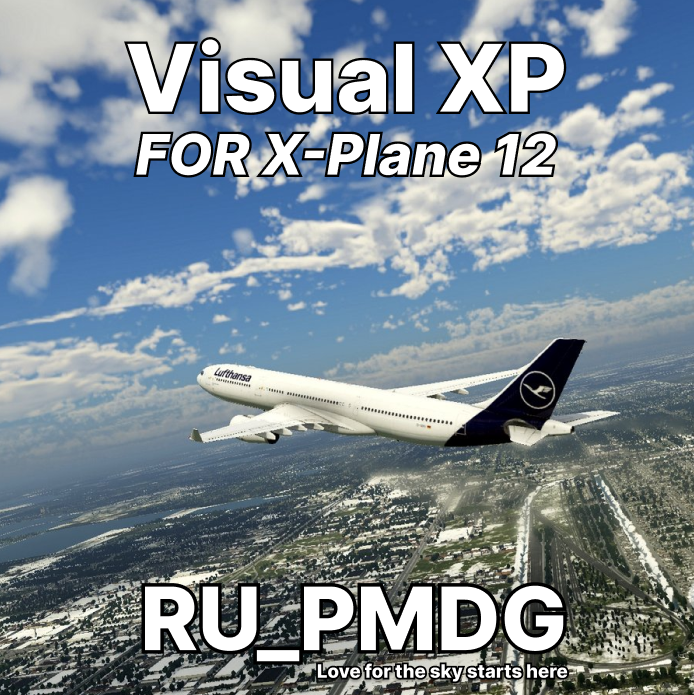
VisualXP will enhance the visual representation of the atmosphere, clouds, water, and landscape (lighting and shadows) in the X-Plane.
Important Note: Currently only for Windows.
VisualXP has its own resource for displaying the weather in real time, you won´t need any additional plugins. With this plugin, you can search the weather for three airports: departing, arriving and alternate, as well as view weather reports for the current location of the aircraft.
VisualXP has its own user interface that displays real-time weather information, search results, and current weather reports for the aircraft location.
The interface contains several tabs. These tabs are called "Atmosphere", "Clouds", "Water", "Landscape" and "Weather". Each tab has its own functions, buttons, and sliders. With these buttons and sliders, you can easily control VisualXP.
The Atmosphere feature will enhance the sun´s illumination, ambient lighting, scattering color temperature, sky colors, fog density, aerosols, visibility range, horizon scattering, and zenith scattering.
All these parameters will be automatically controlled using real calculations to make the sky look more natural and realistic. We have also added sliders for these functions, with which you can adjust the intensity and performance of these functions as you wish.
The Clouds tab has functions and sliders that control cloud formations, cloud visibility range, cloud brightness, cloud density, thickness, cloud cover, and cloud detail; all of these will work together to create more expressive cloud shapes.
On the "Water" tab, there are functions for controlling foam on the water, the glare of the sun, the strength of waves on the water, and zooming. There are also sliders to control these functions.
The Scenery tab has lighting features that simulate real night fog, where multiple light sources illuminate the fog. We can also enable one of the great features of the X-Plane — "fog spotlights", which add realistic spotlights to all objects in the X-Plane. We can also adjust the intensity of light spots on the ground by using sliders to control the size and intensity of the light, as well as the spotlights themselves.
🕒 Work schedule:
🔹 We respond and help from 10:30 – 00:00 (Moscow time, UTC+3) / 07:30 – 21:00 ( UTC)
⭐Why do they trust us?
✔️ We will not leave you alone with difficulties. We solve the issues from the beginning to the complete solution of the problem.
✔️ You receive our warranty for each product.
✔️ We offer an adequate price without extra surcharges.
Why is it more profitable with us?
✔️ We purposefully buy access from inactive users, which allows us to offer low prices without compromising quality.
✔️ And we also sell our own accessories, so we can afford to set prices below market prices!
⚠️ Are you facing a problem?
Don´t worry — write to us right away! Together we will definitely figure out and solve your problem quickly and without unnecessary stress.
, Or look at the instructions on the product page — there are ready-made solutions for the most frequent questions.
Thank you for choosing! Enjoy your flights! ✨
Important Note: Currently only for Windows.
VisualXP has its own resource for displaying the weather in real time, you won´t need any additional plugins. With this plugin, you can search the weather for three airports: departing, arriving and alternate, as well as view weather reports for the current location of the aircraft.
VisualXP has its own user interface that displays real-time weather information, search results, and current weather reports for the aircraft location.
The interface contains several tabs. These tabs are called "Atmosphere", "Clouds", "Water", "Landscape" and "Weather". Each tab has its own functions, buttons, and sliders. With these buttons and sliders, you can easily control VisualXP.
The Atmosphere feature will enhance the sun´s illumination, ambient lighting, scattering color temperature, sky colors, fog density, aerosols, visibility range, horizon scattering, and zenith scattering.
All these parameters will be automatically controlled using real calculations to make the sky look more natural and realistic. We have also added sliders for these functions, with which you can adjust the intensity and performance of these functions as you wish.
The Clouds tab has functions and sliders that control cloud formations, cloud visibility range, cloud brightness, cloud density, thickness, cloud cover, and cloud detail; all of these will work together to create more expressive cloud shapes.
On the "Water" tab, there are functions for controlling foam on the water, the glare of the sun, the strength of waves on the water, and zooming. There are also sliders to control these functions.
The Scenery tab has lighting features that simulate real night fog, where multiple light sources illuminate the fog. We can also enable one of the great features of the X-Plane — "fog spotlights", which add realistic spotlights to all objects in the X-Plane. We can also adjust the intensity of light spots on the ground by using sliders to control the size and intensity of the light, as well as the spotlights themselves.
🕒 Work schedule:
🔹 We respond and help from 10:30 – 00:00 (Moscow time, UTC+3) / 07:30 – 21:00 ( UTC)
⭐Why do they trust us?
✔️ We will not leave you alone with difficulties. We solve the issues from the beginning to the complete solution of the problem.
✔️ You receive our warranty for each product.
✔️ We offer an adequate price without extra surcharges.
Why is it more profitable with us?
✔️ We purposefully buy access from inactive users, which allows us to offer low prices without compromising quality.
✔️ And we also sell our own accessories, so we can afford to set prices below market prices!
⚠️ Are you facing a problem?
Don´t worry — write to us right away! Together we will definitely figure out and solve your problem quickly and without unnecessary stress.
, Or look at the instructions on the product page — there are ready-made solutions for the most frequent questions.
Thank you for choosing! Enjoy your flights! ✨
No feedback yet