✅ Call of Duty: BO7 CP: 500-13000 |Battle|STEAM|Win|Xbox
Content: text (0 symbol)
Available: 1
Uploaded:
Positive responses: 78
Negative responses: 0
Sold: 699
Refunds: 0
Seller: FowGame
information about the seller and its items
Loyalty discount! If the total amount of your purchases from the seller more than:
| $1000 | the discount is | 1% |
$4.37
⚡️ Instant delivery. After payment, you will receive a licensed digital key.
🟢 Account region: All countries + Russia and CIS countries 💡
Platform: One, Series X|S, Windows (Microsoft)
💡 Also compatible with Battle.net, PSN, Steam ❗️BUT❗️see the description below.
⭐️ Works without region change and VPN.
🟢 Account region: All countries + Russia and CIS countries 💡
Platform: One, Series X|S, Windows (Microsoft)
💡 Also compatible with Battle.net, PSN, Steam ❗️BUT❗️see the description below.
⭐️ Works without region change and VPN.
🔵 ATTENTION: For Battle.net, Steam, and PSN platforms, linking a Microsoft profile is required.
❗️ CP currency does not transfer between platforms, only in-game purchases do.
To buy skins or a pass on Battle.net, PSN, or Steam, spend CP using Xbox One, Series X|S, or Windows (Microsoft) for in-game purchases.
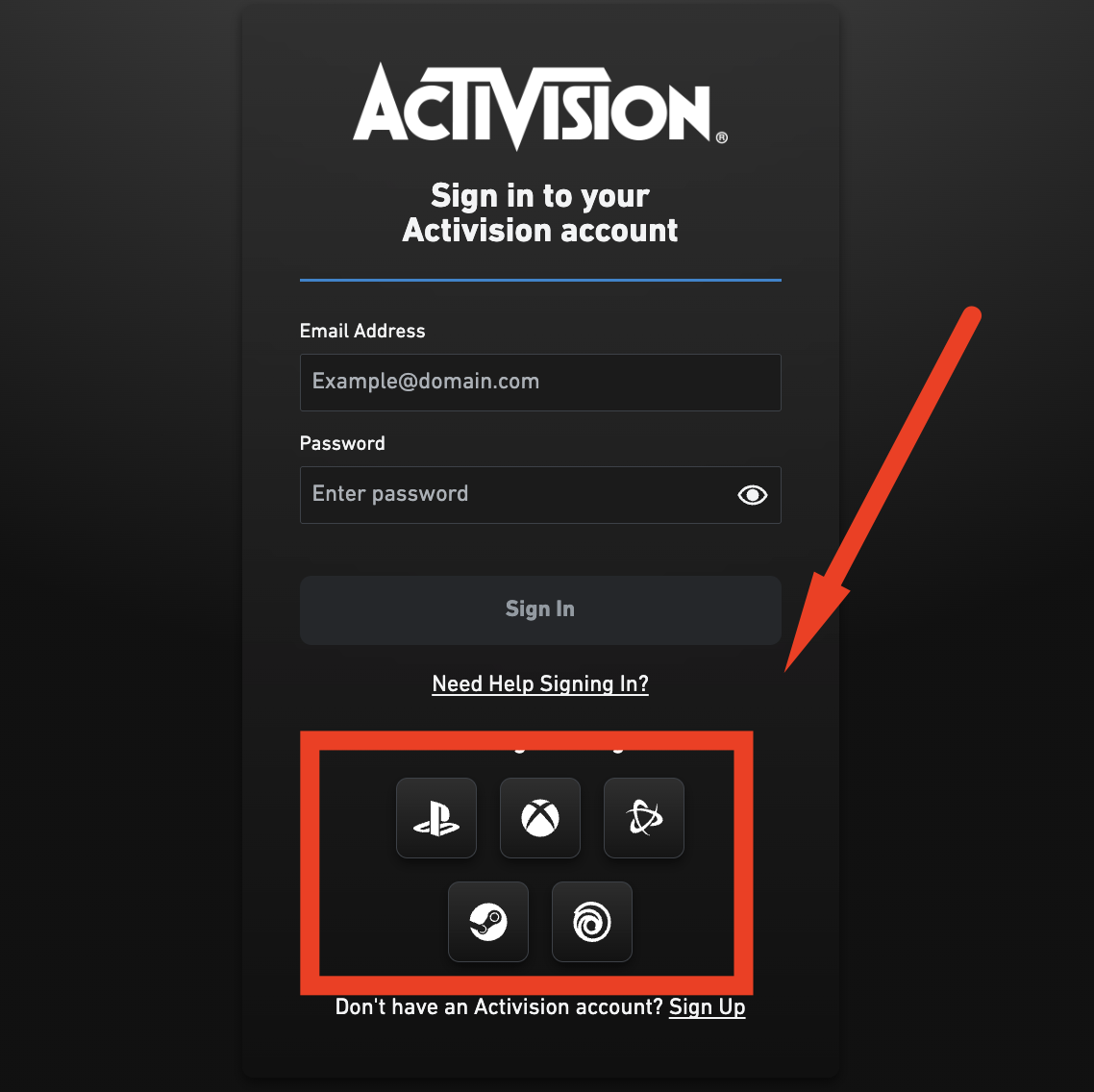
Also for Battle.net, PSN, Steam: before activating the key, we recommend visiting https://s.activision.com/activision/profile, logging into your profile via your main platform (see the product image), and checking the Xbox account linkage there.
💡 We also provide a service for purchasing in-game items or a pass (see description below).
❗️ CP currency does not transfer between platforms, only in-game purchases do.
To buy skins or a pass on Battle.net, PSN, or Steam, spend CP using Xbox One, Series X|S, or Windows (Microsoft) for in-game purchases.
Also for Battle.net, PSN, Steam: before activating the key, we recommend visiting https://s.activision.com/activision/profile, logging into your profile via your main platform (see the product image), and checking the Xbox account linkage there.
💡 We also provide a service for purchasing in-game items or a pass (see description below).
⚡️ Instant delivery. After payment, you will receive a licensed digital key.
🟢 Account region: All countries + Russia and CIS countries
💡 Platform: One, Series X|S, Windows (Microsoft)
💡 Also compatible with Battle.net, PSN, Steam ❗️BUT❗️see the description below.
⭐️ Works without region change and VPN.
🟢 Account region: All countries + Russia and CIS countries
💡 Platform: One, Series X|S, Windows (Microsoft)
💡 Also compatible with Battle.net, PSN, Steam ❗️BUT❗️see the description below.
⭐️ Works without region change and VPN.
🔵 ATTENTION: For Battle.net, Steam, and PSN platforms, linking a Microsoft profile is required.
❗️ CP currency does not transfer between platforms, only in-game purchases do. To buy skins or a pass on Battle.net, PSN, or Steam, spend CP using Xbox One, Series X|S, or Windows (Microsoft) for in-game purchases.
Also for Battle.net, PSN, Steam: before activating the key, we recommend visiting https://s.activision.com/activision/profile, logging into your profile via your main platform (see the product image), and checking the Xbox account linkage there.
💡 We also provide a service for purchasing in-game items or a pass (see description below).
🟢 Code activation process:❗️ CP currency does not transfer between platforms, only in-game purchases do. To buy skins or a pass on Battle.net, PSN, or Steam, spend CP using Xbox One, Series X|S, or Windows (Microsoft) for in-game purchases.
Also for Battle.net, PSN, Steam: before activating the key, we recommend visiting https://s.activision.com/activision/profile, logging into your profile via your main platform (see the product image), and checking the Xbox account linkage there.
💡 We also provide a service for purchasing in-game items or a pass (see description below).
1️⃣ Go to the official Microsoft website to redeem the code: https://www.xbox.com/en-us/redeem
2️⃣ Log into your account.
3️⃣ Redeem the key.
💡 If you are unable to make in-game purchases yourself on One, Series X|S, or Windows (Microsoft), choose the additional service "Assistance for Battle.net, PSN, Steam"
❗️ When selecting the additional service, we will activate the keys ourselves.
❗️ When choosing the additional service, decide in advance and calculate the amount you want to spend. One paid service = one login to your account; repeated logins require separate payment.
🙋♂️ Frequently asked questions about our additional service:
❓ Why do I need your additional service?
✔️ CP currency does not transfer to other platforms, only in-game purchases do. This means you need to spend CP using One, Series X|S, or Windows (Microsoft) for in-game purchases so that skins or passes appear on Battle.net, PSN, or Steam.
❓ If I want to buy two CP keys, do I need to select the additional service for each key?
✔️ No. You can buy multiple keys and select the additional service for only one of them. We will activate the remaining keys ourselves.
❓ How quickly do you complete this service?
✔️ The service is performed during store working hours. Completion time ranges from 5 to 240 minutes depending on the queue, but no more than 24 hours. In very rare cases, coins may appear later than usual due to the game servers.
❓ How is this service performed?
✔️ After payment, you send your Microsoft/Xbox account details in chat and specify what needs to be purchased. Log out of the game. Our staff logs into the account and completes the service.
❗️ Refunds are not provided for reasons such as "bought the wrong item", "could not activate", "did not read the description", or "did not wait for a response and bought from another seller".
⏱️ WORKING HOUR
08.04.2026 15:45:56
Все отлично. Ключ рабочий. Активировал без проблем на консоли
03.04.2026 19:24:36
Все быстро и четко, спасибо 🙏
03.04.2026 19:04:29
Все ок
27.03.2026 17:56:38
Все супер, спасибо
13.03.2026 11:33:55
Все отлично
25.02.2026 20:09:50
Всё получилось 🔥🔥🔥
Спасибо за поддержку 🤜🤛
Спасибо за поддержку 🤜🤛
12.02.2026 18:39:09
+rep
10.02.2026 14:29:01
Спасибо код активировал!!!! цены сочные советую
09.02.2026 17:46:27
Всё супер! Всем советую! Капец моей зарплате...
09.02.2026 15:38:21
Достаточно быстро сделали