DELTA FORCE macro for M4A1. X7 Bloody Logitech Razer
Content: M4A1_DELTA_FORCE_by_doomxtf.com.rar (19.77 KB)
Uploaded: 14.03.2026
Positive responses: -1
Negative responses: 0
Sold: -1
Refunds: -1
Seller: Дмитрий Дум
information about the seller and its items
Loyalty discount! If the total amount of your purchases from the seller more than:
| $20 | the discount is | 2% |
| $50 | the discount is | 5% |
| $100 | the discount is | 8% |
| $150 | the discount is | 10% |
| $200 | the discount is | 13% |
| $250 | the discount is | 15% |
| $300 | the discount is | 18% |
| $350 | the discount is | 22% |
| $1000 | the discount is | 25% |
$13.88
Here is a macro for a mouse from the author Doom.xtf. It will help reduce recoil in the game, automate weapons and take your game level to new heights.
Attention! This is NOT a cheat and has nothing to do with cheats and other prohibited programs. Watch the video demo before purchasing.
---
A DELTA FORCE gaming mouse macro for automation and recoil reduction.
---
Before purchasing, please read the agreement, which is located in the additional description.
---
Supports mice (software): Bloody 7 and 8, A4tech X7, Razer Synapse 3 and 4, Logitech G-Hub*.
---
*The Logitech mouse macro works in a limited mode, controlling 10 to 15 bullets at the beginning of recoil. After installation, the macro will start working immediately - assign an additional left-click button on the mouse before installing the macro.
---
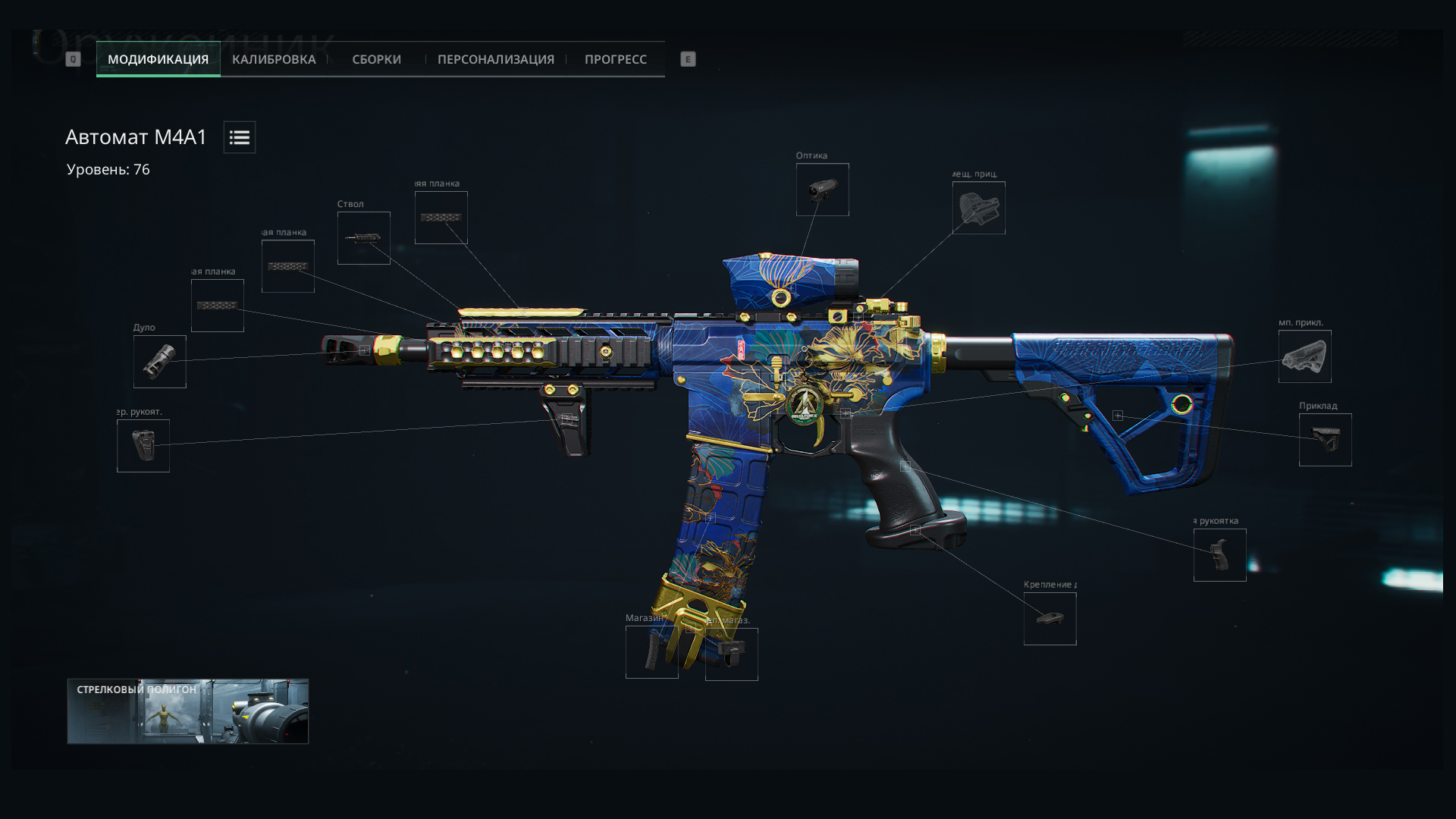
Modules for assembly (screenshots of the assembly can be found in the product card and on my website):
"Hornet" x3 forend
Raid shortened combination barrel for assault rifle
Universal EC front rest
FFC dual-flow muzzle brake
Medium "Honey Badger" magazine loop
45-round magazine
Heavy "Tower" grip for assault rifle
Balanced grip base
High-performance QR buttstock
MODULE CALIBRATION - DEFAULT. You can change the calibration as needed.
---
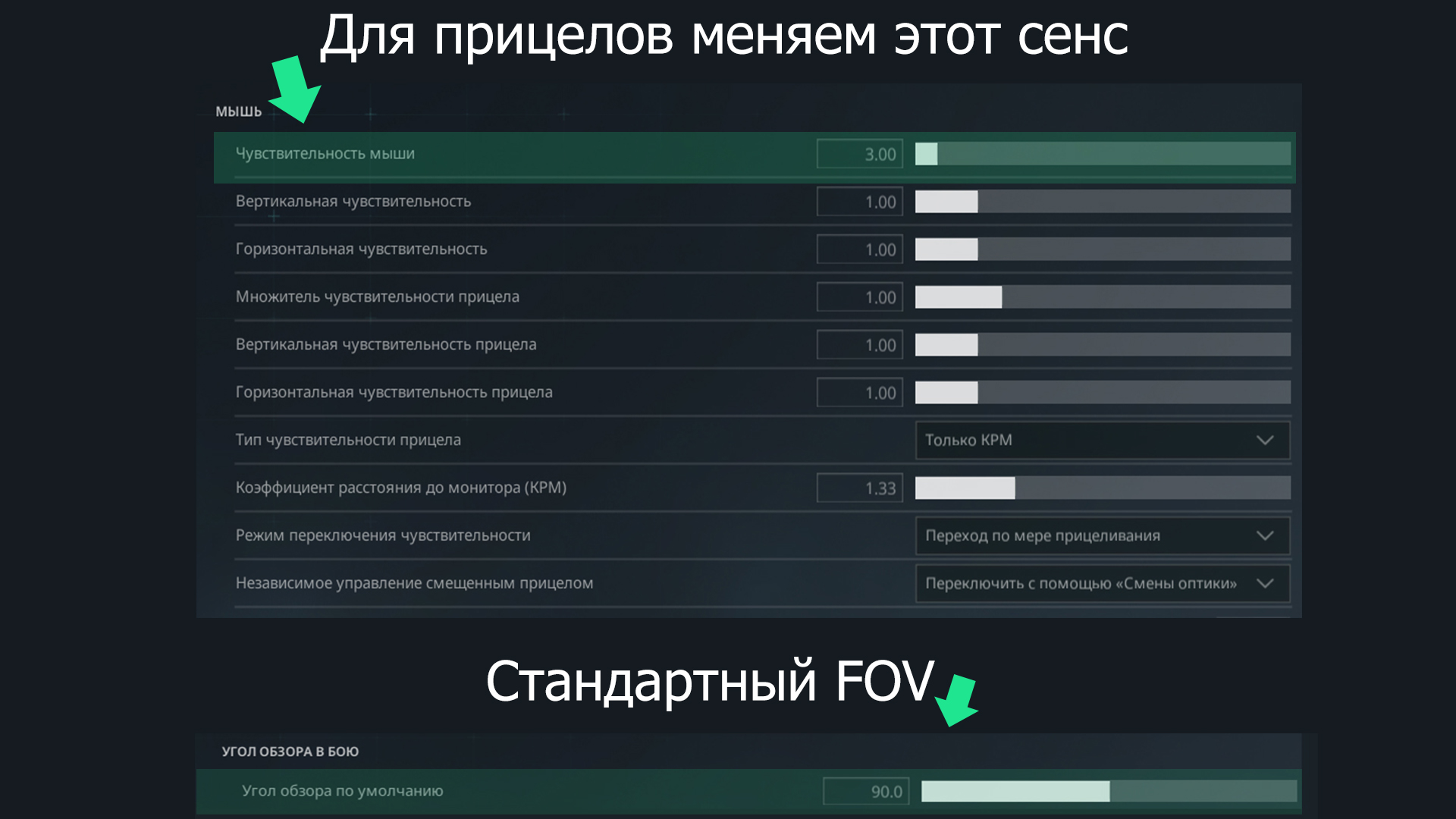
Field of View (FOV), default - 90.
---
In-game scope magnifications and sensitivity:
Magnification x1.2 - In-game sensitivity ~2
Magnification x2.0 - In-game sensitivity ~3
Magnification x3.0 - In-game sensitivity ~4.50
Magnification x3.5 - In-game sensitivity ~5
Magnification x4.0 - In-game sensitivity ~6
Magnification x5.0 - In-game sensitivity ~7.50
Magnification x6.0 - In-game sensitivity ~9
Magnification x7.0 - In-game sensitivity ~10.00
The in-game sensitivity is for reference only. It may vary slightly on different PCs and non-standard weapon builds.
---
Adjust your mouse sensitivity after installing the macro for comfortable gaming.
After purchasing, you will receive an archive containing the macros, instructions, and detailed information. Download it and unzip it with any archiver, including WinRar (http://www.win-rar.ru/download/).
Macro updates and technical support from the author are FREE for the entire duration of the macro. We will resolve any issues with the macros as quickly as possible. Please contact me from the My Purchases section - https://www.oplata.info/info/
---
https://doomxtf.com/lessons/place-macro-on-razer-mouse.html - how to set a macro on Razer?
https://doomxtf.com/lessons/place-macro-on-logitech-mouse.html - how to set a macro on Logitech?
https://doomxtf.com/lessons/place-macro-on-bloody-mouse.html - how to set a macro to Bloody?
https://doomxtf.com/lessons/place-macro-on-x7-mouse.html - how to set a macro on X7?
https://doomxtf.com/lessons/place-macro-on-any-mouse.html - how to install a macro on ANY mouse?
---
https://doomxtf.com/x7-bloody-macroseffects-download/razer-synapse-download.html - download drivers for Razer.
https://doomxtf.com/x7-bloody-macroseffects-download/logitech-g-hub-download.html - download drivers for Logitech.
https://doomxtf.com/x7-bloody-macroseffects-download/bloody-drivers-download.html - download drivers for Bloody.
https://doomxtf.com/x7-oscar-editor-download.html - download drivers for X7.
https://doomxtf.com/x7-bloody-macroseffects-download/macros-effects-download.html - download MacrosEffects for any mouse.
Attention! This is NOT a cheat and has nothing to do with cheats and other prohibited programs. Watch the video demo before purchasing.
---
A DELTA FORCE gaming mouse macro for automation and recoil reduction.
---
Before purchasing, please read the agreement, which is located in the additional description.
---
Supports mice (software): Bloody 7 and 8, A4tech X7, Razer Synapse 3 and 4, Logitech G-Hub*.
---
*The Logitech mouse macro works in a limited mode, controlling 10 to 15 bullets at the beginning of recoil. After installation, the macro will start working immediately - assign an additional left-click button on the mouse before installing the macro.
---
Modules for assembly (screenshots of the assembly can be found in the product card and on my website):
"Hornet" x3 forend
Raid shortened combination barrel for assault rifle
Universal EC front rest
FFC dual-flow muzzle brake
Medium "Honey Badger" magazine loop
45-round magazine
Heavy "Tower" grip for assault rifle
Balanced grip base
High-performance QR buttstock
MODULE CALIBRATION - DEFAULT. You can change the calibration as needed.
---
Field of View (FOV), default - 90.
---
In-game scope magnifications and sensitivity:
Magnification x1.2 - In-game sensitivity ~2
Magnification x2.0 - In-game sensitivity ~3
Magnification x3.0 - In-game sensitivity ~4.50
Magnification x3.5 - In-game sensitivity ~5
Magnification x4.0 - In-game sensitivity ~6
Magnification x5.0 - In-game sensitivity ~7.50
Magnification x6.0 - In-game sensitivity ~9
Magnification x7.0 - In-game sensitivity ~10.00
The in-game sensitivity is for reference only. It may vary slightly on different PCs and non-standard weapon builds.
---
Adjust your mouse sensitivity after installing the macro for comfortable gaming.
After purchasing, you will receive an archive containing the macros, instructions, and detailed information. Download it and unzip it with any archiver, including WinRar (http://www.win-rar.ru/download/).
Macro updates and technical support from the author are FREE for the entire duration of the macro. We will resolve any issues with the macros as quickly as possible. Please contact me from the My Purchases section - https://www.oplata.info/info/
---
https://doomxtf.com/lessons/place-macro-on-razer-mouse.html - how to set a macro on Razer?
https://doomxtf.com/lessons/place-macro-on-logitech-mouse.html - how to set a macro on Logitech?
https://doomxtf.com/lessons/place-macro-on-bloody-mouse.html - how to set a macro to Bloody?
https://doomxtf.com/lessons/place-macro-on-x7-mouse.html - how to set a macro on X7?
https://doomxtf.com/lessons/place-macro-on-any-mouse.html - how to install a macro on ANY mouse?
---
https://doomxtf.com/x7-bloody-macroseffects-download/razer-synapse-download.html - download drivers for Razer.
https://doomxtf.com/x7-bloody-macroseffects-download/logitech-g-hub-download.html - download drivers for Logitech.
https://doomxtf.com/x7-bloody-macroseffects-download/bloody-drivers-download.html - download drivers for Bloody.
https://doomxtf.com/x7-oscar-editor-download.html - download drivers for X7.
https://doomxtf.com/x7-bloody-macroseffects-download/macros-effects-download.html - download MacrosEffects for any mouse.
Definition of terms:
1. Buyer - a person who pays in money and is the purchaser of a product or service.
2. Seller - a person, a person, for an appropriate remuneration, transfers a product or service to the buyer.
3. Product - also a software product, digital product, software - is a set of scripts in the form of macros installed on peripheral gaming devices. List of devices and manufacturers
determined for each product separately.
4. Devices - a gaming mouse and/or keyboard, as well as hardware, a physical device that is purchased separately by the consumer.
The seller undertakes:
1. Transfer the digital product to the buyer through the trading platform.
2. Reliably describe the consumer qualities of a digital product.
3. Consult the buyer if necessary.
4. Update the software product as needed (set by the seller).
The buyer undertakes:
1. Pay for the purchased digital product in any way available for the trading platform and accept it.
Denial of responsibility:
By purchasing a product, you agree to the "Disclaimer". If you do not agree with any provision of the Disclaimer, please refrain from purchasing the product.
1. The buyer is an experienced PC user and is able to work in basic interfaces.
2. The buyer is able to independently configure and install the software product based on the instructions provided by the seller.
3. The buyer has equipment (mouse\keyboard) in full compatibility with which is indicated in the product description.
4. The buyer accepts that the software product (software) is designed to work with physical (hardware) devices (mouse / keyboard), stable operation in emulator programs cannot be guaranteed.
5. The buyer is aware that the seller is not responsible for the actions of third parties that entailed changes in the operation of the device (hardware) or software product (software).
6. The buyer accepts that in the event of: a) a malfunction, b) a blockage, c) a breakdown and / or other reasons that made it impossible to use the device (hardware) as a result of actions
third parties or the buyer himself (the owner of the device\hardware), the seller of the software product (software) is not liable to the buyer.
1. Buyer - a person who pays in money and is the purchaser of a product or service.
2. Seller - a person, a person, for an appropriate remuneration, transfers a product or service to the buyer.
3. Product - also a software product, digital product, software - is a set of scripts in the form of macros installed on peripheral gaming devices. List of devices and manufacturers
determined for each product separately.
4. Devices - a gaming mouse and/or keyboard, as well as hardware, a physical device that is purchased separately by the consumer.
The seller undertakes:
1. Transfer the digital product to the buyer through the trading platform.
2. Reliably describe the consumer qualities of a digital product.
3. Consult the buyer if necessary.
4. Update the software product as needed (set by the seller).
The buyer undertakes:
1. Pay for the purchased digital product in any way available for the trading platform and accept it.
Denial of responsibility:
By purchasing a product, you agree to the "Disclaimer". If you do not agree with any provision of the Disclaimer, please refrain from purchasing the product.
1. The buyer is an experienced PC user and is able to work in basic interfaces.
2. The buyer is able to independently configure and install the software product based on the instructions provided by the seller.
3. The buyer has equipment (mouse\keyboard) in full compatibility with which is indicated in the product description.
4. The buyer accepts that the software product (software) is designed to work with physical (hardware) devices (mouse / keyboard), stable operation in emulator programs cannot be guaranteed.
5. The buyer is aware that the seller is not responsible for the actions of third parties that entailed changes in the operation of the device (hardware) or software product (software).
6. The buyer accepts that in the event of: a) a malfunction, b) a blockage, c) a breakdown and / or other reasons that made it impossible to use the device (hardware) as a result of actions
third parties or the buyer himself (the owner of the device\hardware), the seller of the software product (software) is not liable to the buyer.
No feedback yet