ssassin´s Creed Shadows Premium Edition & Avatar From The Ashes + 28 games Ubisoft
Content: text (0 symbol)
Uploaded: 04.01.2026
Positive responses: 0
Negative responses: 0
Sold: 0
Refunds: 0
$7.14

Get immediate access to a shared Steam offline account with the game activated on it
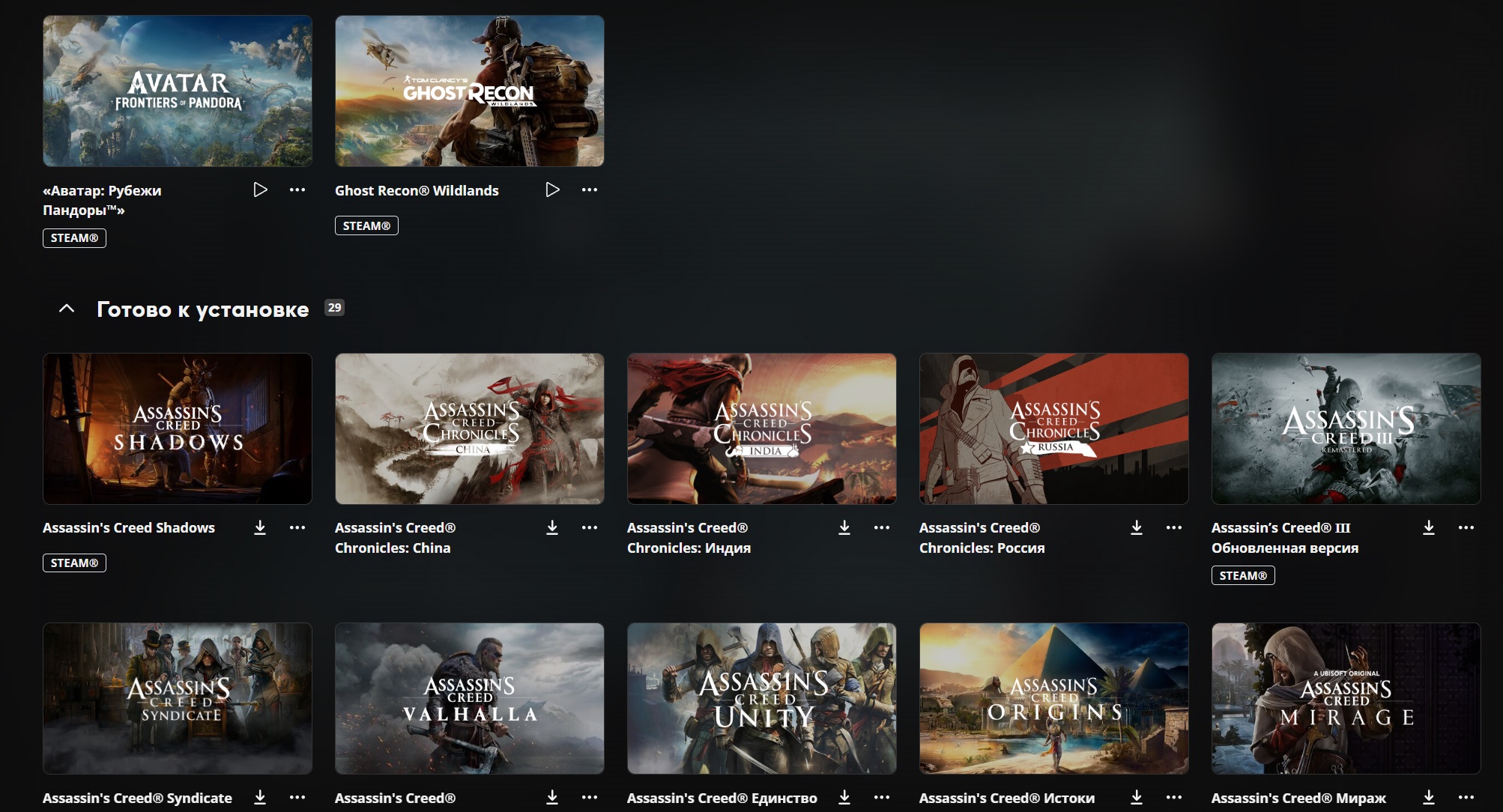
The account contains almost all the games of the Assassin´s Creed series with all DLC, all parts of Far Cry with all DLC, Avatar: Frontiers of Pandora with all DLC, Star Wars Outlaws with all DLC and other games, the full list is below.
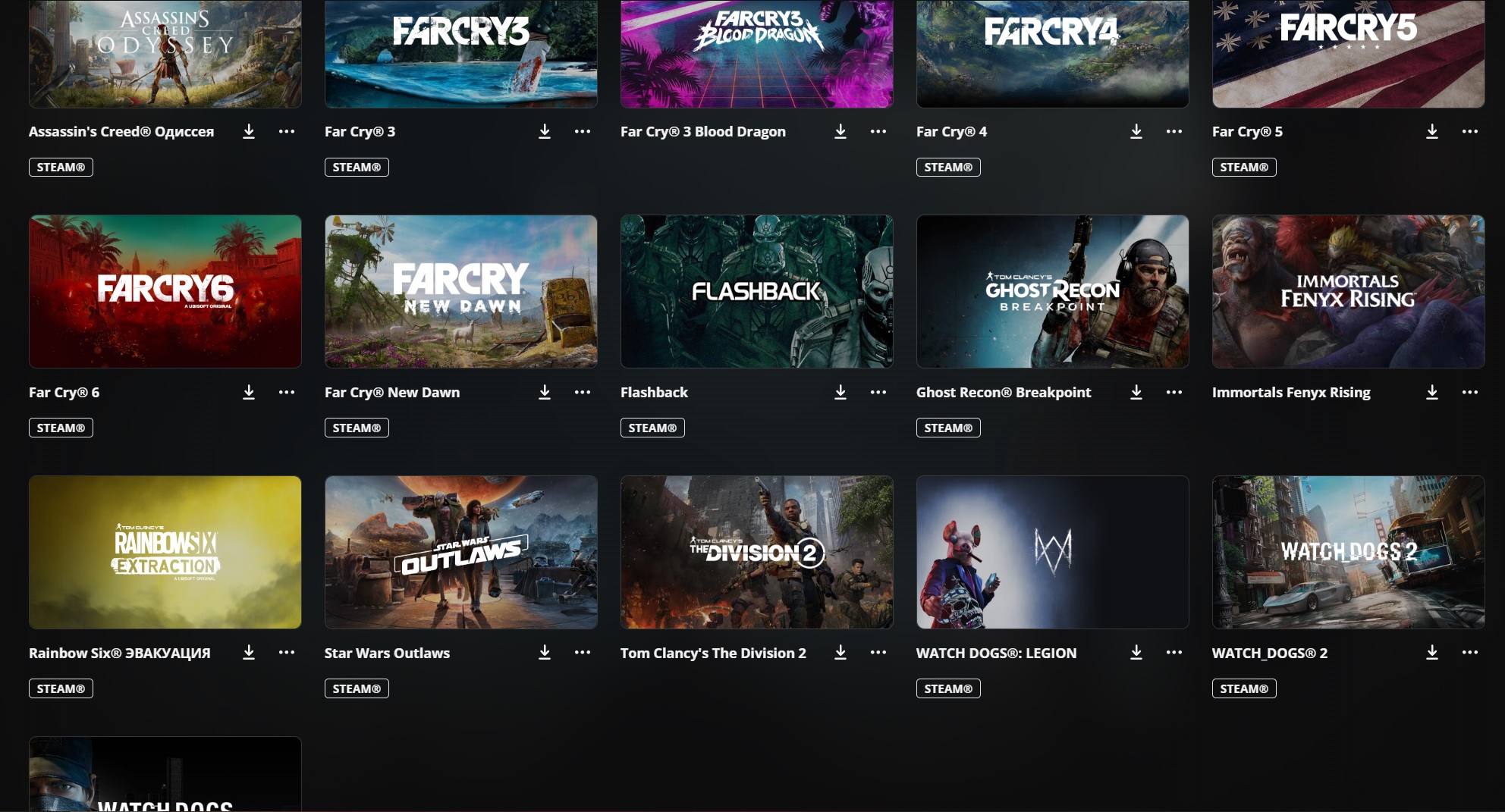
The account has games such as:
1) Assassin´s Creed Shadows Premium Edition
2) Assassin´s Creed® Chronicles: China
3) Assassin´s Creed® Chronicles: India
4) Assassin´s Creed® Chronicles: Russia
5) Assassin’s Creed® Ⅲ Remastered
6) Assassin´s Creed® Syndicate Gold Edition
7) Assassin´s Creed® Unity
8) Assassin´s Creed Origins - Gold Edition
9) Assassin´s Creed Odyssey - Gold Edition
10) Assassin´s Creed Valhalla - Complete Edition
11) Assassin´s Creed Mirage
12) Far Cry 3
13) Far Cry 3 - Blood Dragon
14) Far Cry 4 Gold Edition
15) Far Cry 5 Gold Edition
16) Far Cry New Dawn Deluxe Edition
17) Far Cry 6 Game of the Year Edition
18) Tom Clancy´s Ghost Recon® Breakpoint - Ultimate Edition
19) Tom Clancy´s Ghost Recon Wildlands - Gold Year 2
20) Tom Clancy’s Rainbow Six® Extraction
21) Immortals Fenyx Rising
22) Tom Clancy´s The Division 2 Ultimate Edition
23) Flashback
24) Star Wars Outlaws - Gold Edition
25) Watch_Dogs Complete
26) Watch_Dogs 2 Gold Edition
27) Watch Dogs: Legion Ultimate Edition
28) Avatar: Frontiers of Pandora From The Ashes Edition ALL DLC
🟢 After paying for access, you will receive:
✔️ Login and Password from your Steam and Ubisoft Connect accounts
✔️ Guaranteed, the account is indefinite (it remains yours forever)
✔️ The ability to update the game
✔️ You can play OFFLINE ONLY!
✔️ No activation installation required
🔴 Prohibited
❌ Changing account data and settings
❌ Transfer data to third parties
❌ Use cheats, prohibited programs, violate the rules of the game
❗ If the rules are violated , access to the account is blocked without a refund
⚪ Important information
❕ Before purchasing, make sure that your PC meets the system requirements, if they do not comply, no refund will be made!
✉️ If you have any questions, write to us, we will always answer.
The account contains almost all the games of the Assassin´s Creed series with all DLC, all parts of Far Cry with all DLC, Avatar: Frontiers of Pandora with all DLC, Star Wars Outlaws with all DLC and other games, the full list is below.
The account has games such as:
1) Assassin´s Creed Shadows Premium Edition
2) Assassin´s Creed® Chronicles: China
3) Assassin´s Creed® Chronicles: India
4) Assassin´s Creed® Chronicles: Russia
5) Assassin’s Creed® Ⅲ Remastered
6) Assassin´s Creed® Syndicate Gold Edition
7) Assassin´s Creed® Unity
8) Assassin´s Creed Origins - Gold Edition
9) Assassin´s Creed Odyssey - Gold Edition
10) Assassin´s Creed Valhalla - Complete Edition
11) Assassin´s Creed Mirage
12) Far Cry 3
13) Far Cry 3 - Blood Dragon
14) Far Cry 4 Gold Edition
15) Far Cry 5 Gold Edition
16) Far Cry New Dawn Deluxe Edition
17) Far Cry 6 Game of the Year Edition
18) Tom Clancy´s Ghost Recon® Breakpoint - Ultimate Edition
19) Tom Clancy´s Ghost Recon Wildlands - Gold Year 2
20) Tom Clancy’s Rainbow Six® Extraction
21) Immortals Fenyx Rising
22) Tom Clancy´s The Division 2 Ultimate Edition
23) Flashback
24) Star Wars Outlaws - Gold Edition
25) Watch_Dogs Complete
26) Watch_Dogs 2 Gold Edition
27) Watch Dogs: Legion Ultimate Edition
28) Avatar: Frontiers of Pandora From The Ashes Edition ALL DLC
🟢 After paying for access, you will receive:
✔️ Login and Password from your Steam and Ubisoft Connect accounts
✔️ Guaranteed, the account is indefinite (it remains yours forever)
✔️ The ability to update the game
✔️ You can play OFFLINE ONLY!
✔️ No activation installation required
🔴 Prohibited
❌ Changing account data and settings
❌ Transfer data to third parties
❌ Use cheats, prohibited programs, violate the rules of the game
❗ If the rules are violated , access to the account is blocked without a refund
⚪ Important information
❕ Before purchasing, make sure that your PC meets the system requirements, if they do not comply, no refund will be made!
✉️ If you have any questions, write to us, we will always answer.
1) Enter Steam and Ubisoft Connect data, log in.
2) Download the games you need on Steam.
3) Launch the games you downloaded from Steam (You do not need to manually launch Ubisoft Connect, it will automatically launch itself), go to the game menu,
then exit the game and turn Steam and Ubisoft Connect offline.
(instructions for the Ubisoft Connect offline mode are described below)
4) Play offline.
5) If Ubisoft Connect or Steam asks for a password, enter it in the same offline mode and continue playing.
!important!
Let´s remind you once again, what is indicated in the description.
It is forbidden to change account settings, profile data, or affect family access.
This is considered a violation and we block access for this!
We count on your honesty.
_______________________________________________________________________________________________
Instructions for running Ubisoft Connect games in offline mode.
1) Launch the game online and wait for the game menu to appear, then exit the game.
2) Open Windows Firewall and create a rule that will block network access for UplayWebCore.exe and upc.exe.
3) Go to AppData\Local\Ubisoft Game Launcher, change the offline value in settings.yaml and settings.yaml.tmp
(value->offline: true) - also remember to set both files to read-only.
4) Launch Ubisoft Connect; it will inform you that it cannot connect to the internet.
5) Click "Back" and re-enter your account password, click "Connect"
(the "Connection lost" error message appears again), then click "Offline Mode."
2) Download the games you need on Steam.
3) Launch the games you downloaded from Steam (You do not need to manually launch Ubisoft Connect, it will automatically launch itself), go to the game menu,
then exit the game and turn Steam and Ubisoft Connect offline.
(instructions for the Ubisoft Connect offline mode are described below)
4) Play offline.
5) If Ubisoft Connect or Steam asks for a password, enter it in the same offline mode and continue playing.
!important!
Let´s remind you once again, what is indicated in the description.
It is forbidden to change account settings, profile data, or affect family access.
This is considered a violation and we block access for this!
We count on your honesty.
_______________________________________________________________________________________________
Instructions for running Ubisoft Connect games in offline mode.
1) Launch the game online and wait for the game menu to appear, then exit the game.
2) Open Windows Firewall and create a rule that will block network access for UplayWebCore.exe and upc.exe.
3) Go to AppData\Local\Ubisoft Game Launcher, change the offline value in settings.yaml and settings.yaml.tmp
(value->offline: true) - also remember to set both files to read-only.
4) Launch Ubisoft Connect; it will inform you that it cannot connect to the internet.
5) Click "Back" and re-enter your account password, click "Connect"
(the "Connection lost" error message appears again), then click "Offline Mode."
No feedback yet