💵 AUTO-TOPUP STEAM 🚀 RU/KZ/UA/KG/CIS⚡24/7
Content: text (16 symbols)
Available: 1
Uploaded: 28.01.2024
Positive responses: 54
Negative responses: 0
Sold: 100
Refunds: 0
$0.03

🔥 INSTANT STEAM BALANCE TOP-UP (24/7/365) after purchase! 🔥
💵 You are purchasing an automatic balance top-up for your Steam account.⚡You can pay at any time, day or night. No need to send a unique Digiseller code or wait for the Seller´s response!
✅ After purchasing an item, the funds will be credited to your Steam account INSTANTLY.
✅ You do not need to provide the Seller with a unique code; everything is fully automated.
✅ Top-ups are available for accounts with the following currencies: RUB, UAH, KZT, and other CIS countries.
✅ Top-ups are available for new accounts (newly created ones)*.
✅ Top-ups for Steam accounts in the LPR/DPR or Crimea are available from the "Russia" region (see F.A.Q.).
✅ Top-ups are made in USD, which are then converted into rubles at the current exchange rate (which is constantly changing). So, try to top up the amount slightly more, as this can lead to a loss of currency. It is not technically possible to send the exact amount due to exchange rate instability.
✅ You can make a test purchase of 10 RUB and check how everything works!
❗ATTENTION❗✅ You do not need to provide the Seller with a unique code; everything is fully automated.
✅ Top-ups are available for accounts with the following currencies: RUB, UAH, KZT, and other CIS countries.
✅ Top-ups are available for new accounts (newly created ones)*.
✅ Top-ups for Steam accounts in the LPR/DPR or Crimea are available from the "Russia" region (see F.A.Q.).
✅ Top-ups are made in USD, which are then converted into rubles at the current exchange rate (which is constantly changing). So, try to top up the amount slightly more, as this can lead to a loss of currency. It is not technically possible to send the exact amount due to exchange rate instability.
✅ You can make a test purchase of 10 RUB and check how everything works!
We do not top up funds in China, Turkey, the Netherlands, the USA, Poland, Argentina, Denmark, and other EU countries!⭐ Instructions:1️⃣ Enter the required balance amount.
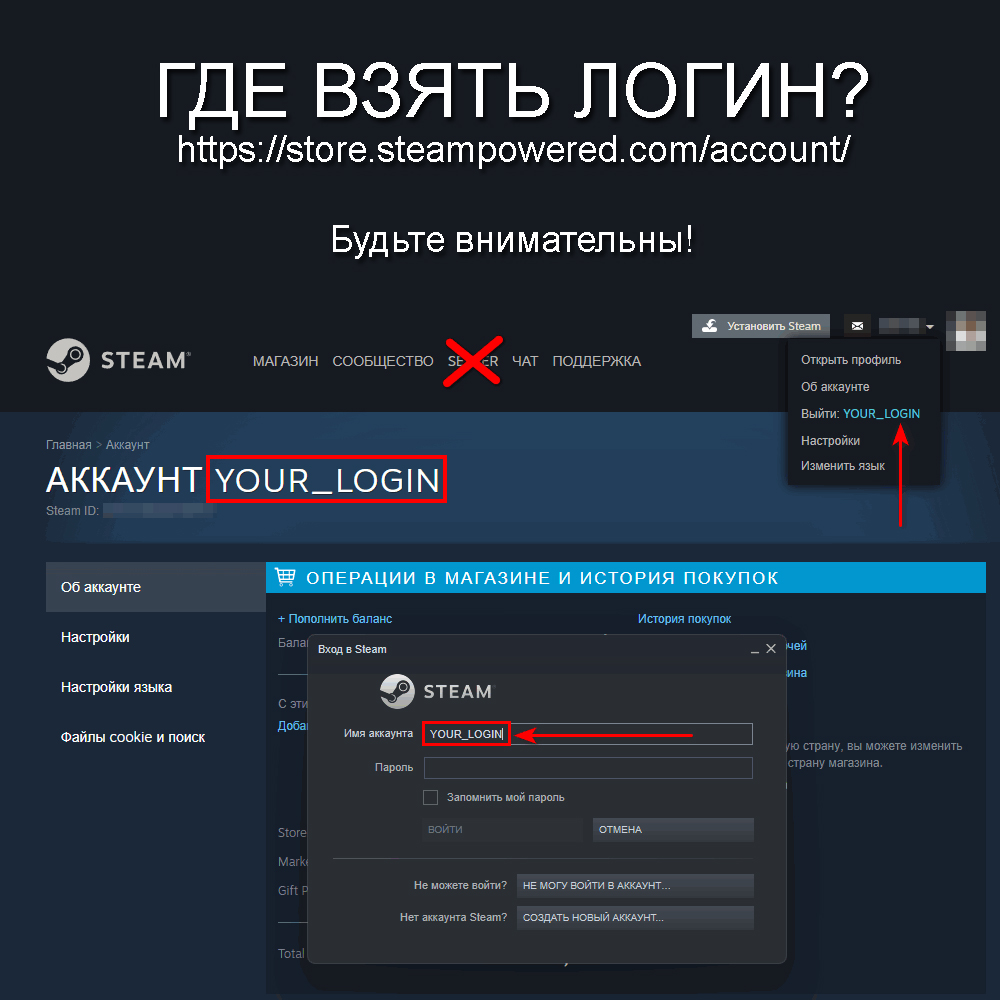
2️⃣ Enter your Steam account LOGIN and check that it is spelled correctly.
3️⃣ Pay for the item by following the instructions.
4️⃣ After successful payment, the top-up process will automatically begin (crediting within ~15 seconds).
📝 F.A.Q:
Q: What is LOGIN?A: Login is what you enter when logging into your Steam account. Please do not confuse your Nickname with your Login. You can change your nickname at any time, but you can´t change your login. It´s set during registration and will remain for the life of your account.
Q: My balance received is higher or lower than the specified amount. What should I do?
A: When depositing funds, the system converts funds into another currency, which may result in an error of 1-3% in either direction.
Q: How do I top up my LPR/DPR or Crimea account?
A: Close the client on your PC and disable mobile data on your smartphone (or put it in airplane mode). Then log in to the Steam website in your browser using a IP with the location set to RUSSIA (it´s important that it´s set to RUSSIA).
Q: I´m having a problem. How can I contact technical support?
A: Log in here - http://oplata.info/info/?lang=ru-RU and write in "Correspondence with the seller"deliveryattention⚠️ Information / rules:/attention• If your account region is Russia, you will receive rubles; if your account region is Ukraine, you will receive hryvnia (at the VISA/MasterCard exchange rate); if your account region is Kazakhstan, you will receive tenge (at the Steam exchange rate), etc.
• If your order is not fulfilled for a long time, there is most likely a problem with the payment gateway. In any case, we will fulfill your order as soon as the issue with the provider is resolved.
• A 1-3% margin of error is permissible for both payments. Please top up your account with a small reserve to ensure sufficient funds. • Verify your login when purchasing (the login is what you enter in the Steam authorization window, NOT your nickname or email address).
• If you successfully pay using an incorrect login, your funds will not be refunded. The "correct" login will not be credited. Be careful and avoid mistakes. Also, make test purchases.
• *If you have an account that has never been credited (new), we do not recommend purchasing a large credit. Steam may change your region to Uzbekistan or Kazakhstan, or change your currency to USD.
• The daily limit on Steam account credits by any method is $500. If this limit is exceeded, we are not responsible for delivery.
• If you have any problems, please contact "Contact the seller." We will try to respond as quick
18.02.2024 10:04:05
Здорово и классно, проблем не возникло, нужно было подождать немного)
29.12.2023 13:34:57
🎄 Продавец быстро ответил, быстро все сделал, деньги быстро поступили на баланс - рекомендую!
Всех кто прочитает этот отзыв, С Наступающим Новым Годом и Рождеством 🎄
Всех кто прочитает этот отзыв, С Наступающим Новым Годом и Рождеством 🎄
25.12.2023 16:55:27
Все пришло! Спасибо продавец лучший
01.11.2023 18:06:16
Все прекрасно без скама спасибо вам
14.07.2023 15:26:11
Лучший продавец пополнение моментальное , good seller.
04.07.2023 16:02:50
Прошло всё отлично. Деньги в Стим пришли за 5 секунд.
30.06.2023 21:17:00
Продавец хороший! Деньги пришли!
13.05.2023 10:56:11
Все супер и быстро!!!
05.05.2023 21:01:52
я тут 2 раз брал как и 1 раз)
29.04.2023 18:53:45
моментально прилетели денюжки, оплатил 95р. пришло чуть больше 58р.